What if you could swap Bitcoin for USDT without opening a browser? No website. No account creation. No uploading your passport.
GhostSwap’s Telegram bot makes this possible. You can exchange 1600+ cryptocurrencies directly inside Telegram—the same app you already use every day.
Here’s how it works and why thousands of traders are switching from traditional exchanges to swapping crypto in their DMs.
Why Swap Crypto on Telegram?
Traditional crypto exchanges come with friction:
- Websites get blocked. VPNs slow things down. Some countries restrict access entirely.
- Accounts require KYC. Uploading IDs, waiting for verification, risking data breaches.
- Bookmark clutter. Another login, another password, another 2FA code.
Telegram changes the game. It’s already on your phone. It’s encrypted. It works everywhere.
GhostSwap built a bot that brings the entire exchange experience into Telegram. No browser tabs. No signups. Just open a chat and swap.
How the GhostSwap Telegram Bot Works
The bot guides you through a simple 5-step process. The whole thing takes about 60 seconds.
Step 1: Start the Bot
Open Telegram and search for @ghostswap_crypto_bot or click here to start.
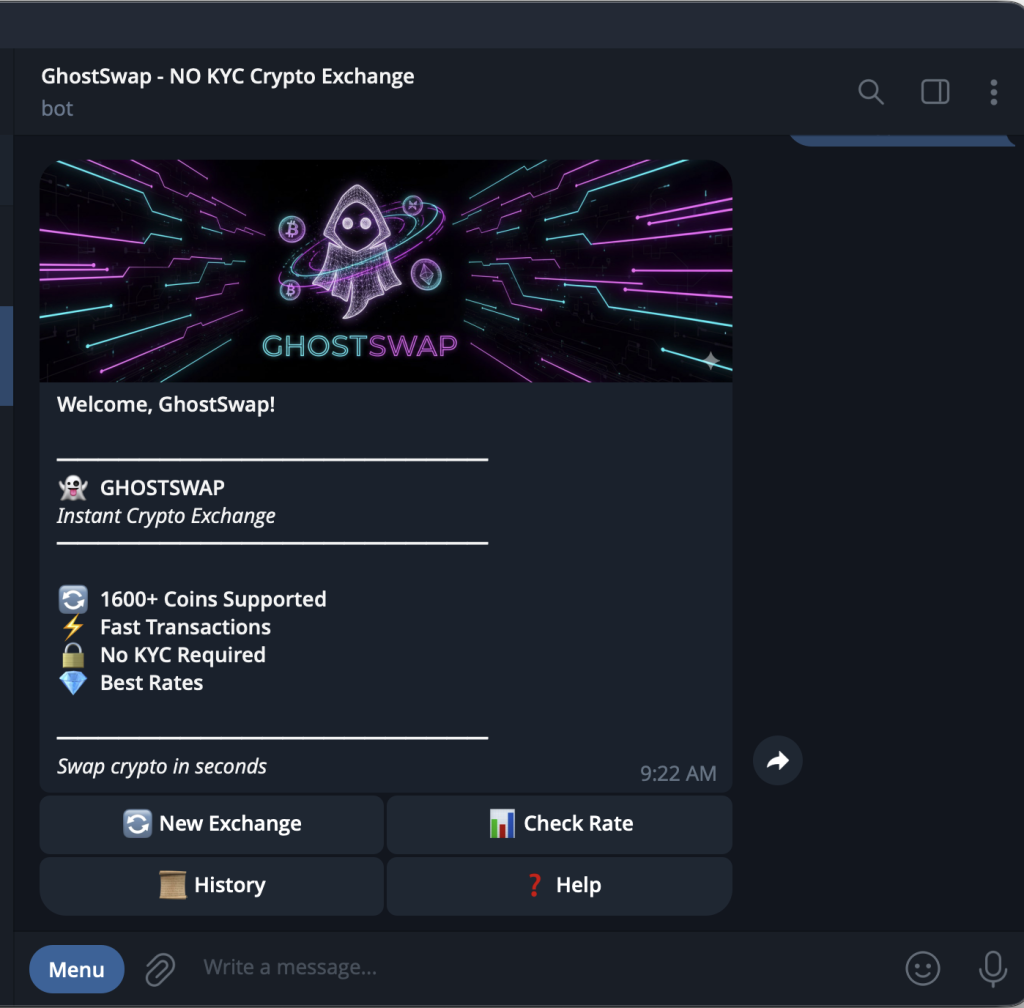
Tap Start and you’ll see the welcome screen:
- 🔄 1600+ Coins Supported
- ⚡ Fast Transactions
- 🔒 No KYC Required
- 💎 Best Rates
Four buttons appear: New Exchange, Check Rate, History, and Help.
Tap New Exchange to begin your swap.
Step 2: Select the Coin You Want to Swap
The bot asks: “What crypto do you want to swap?”
You’ll see popular options laid out as buttons:
| BTC | ETH | SOL |
| XMR | LTC | DOGE |
| XRP | TRX | ADA |
| BNB | POL | USDT |
Don’t see your coin? Tap Search to find any of the 1600+ supported cryptocurrencies.
Select the coin you’re sending (for example, BTC).
Step 3: Select the Coin You Want to Receive
Same process—pick what you want to receive.
Want to swap Bitcoin to stablecoins? Select USDT. Moving to a privacy coin? Choose XMR. Rebalancing your portfolio? Pick ETH or SOL.
Step 4: Enter the Amount
The bot shows you:
- Minimum amount (covers network fees)
- Maximum amount (up to 500+ BTC per swap—no arbitrary limits)
Type how much you want to exchange. For example: 0.11
The bot instantly calculates your estimated receive amount based on current rates.
Step 5: Confirm and Send
You’ll see a confirmation screen with everything you need:
🔄 0.11 BTC → ~9632.75 USDT

📤 YOU SEND:
0.11 BTC to this address:
bc1q22fkn5gn4qjdex3kj623u8j748zl3d8cyyvhs2

📥 YOU RECEIVE:
~9632.75 USDT to your wallet:
0xc7d5859c09...281ce73b
The bot provides:
- Show QR Code – Scan from your wallet app
- Copy Address – One tap to copy the deposit address
- Check Status – Track your swap in real-time
Send your crypto to the deposit address. Once the network confirms your transaction, your swapped coins arrive in your wallet automatically.
No emails. No confirmations to click. No waiting for “manual review.”
What Makes This Different from Other Telegram Bots?
Crypto Telegram bots aren’t new. But most of them are either scams or clunky interfaces for sketchy exchanges.
GhostSwap is different:
| Feature | GhostSwap Bot | Most Telegram Bots |
|---|---|---|
| Coins Supported | 1600+ | 10-50 |
| KYC Required | Never | Often for larger amounts |
| Max Swap Limit | 500+ BTC | Usually capped at 1-2 BTC |
| Rate Transparency | Check rates before swapping | Hidden fees |
| Swap History | Built-in tracking | None |
| Support | Help button + live support | Nothing |
GhostSwap has processed $750M+ in swaps with 1.5M+ users. The Telegram bot connects to the same infrastructure that powers the main website—same rates, same speed, same reliability.
Best Use Cases for the Telegram Bot
Quick Portfolio Rebalancing
Market moving fast? Swap SOL to USDT in 60 seconds without logging into an exchange.
Privacy Coin Conversions
Convert BTC to XMR (Monero) directly in Telegram. No KYC triggers. No account flags.
On-the-Go Trading
Traveling? Airport WiFi blocking exchange websites? The Telegram bot works anywhere Telegram works.
Avoiding CEX Withdrawal Delays
Instead of depositing to Binance, waiting for confirmation, trading, then withdrawing—just swap directly wallet-to-wallet.
Moving Profits to Stables
Made gains on meme coins? Convert PEPE, BONK, or SHIB to USDT instantly before the market turns.
Supported Cryptocurrencies
The GhostSwap Telegram bot supports 1600+ coins across all major blockchains:
Major Coins: BTC, ETH, SOL, XRP, ADA, DOT, AVAX, MATIC
Stablecoins: USDT (ERC-20, TRC-20, BEP-20), USDC, DAI, BUSD
Privacy Coins: XMR (Monero), ZEC (Zcash)
Meme Coins: DOGE, SHIB, PEPE, BONK, FLOKI, WIF
Layer 2 & DeFi: ARB, OP, LDO, UNI, AAVE
Can’t find a coin? Use the Search function in the bot to look up any supported asset.
Is the GhostSwap Telegram Bot Safe?
Three things to know:
1. Non-Custodial GhostSwap never holds your funds. Crypto goes directly from your wallet to the swap, then to your destination wallet. There’s no account balance to hack.
2. No Personal Data The bot doesn’t ask for your name, email, ID, or phone number. Your Telegram username isn’t even stored.
3. Verified on Blockchain Every swap generates a transaction ID. You can verify your transaction on public blockchain explorers like Etherscan or Blockchain.com.
Frequently Asked Questions
How do I start using the GhostSwap Telegram bot?
Open Telegram, search for @ghostswap_crypto_bot, and tap Start. No signup or account creation needed. You can begin swapping immediately.
Does the Telegram bot require KYC?
No. The GhostSwap Telegram bot never requires identity verification. Over 99.5% of swaps complete without any KYC requests.
What’s the minimum and maximum swap amount?
Minimums vary by coin (enough to cover network fees—usually a few dollars). Maximums are generous—over 500 BTC per swap with no arbitrary limits.
How long do swaps take?
Most swaps complete in 5-30 minutes depending on blockchain confirmation times. Bitcoin typically takes longer than Solana or Tron-based tokens.
Can I check rates before swapping?
Yes. Tap Check Rate from the main menu to see current exchange rates without committing to a swap.
What if my swap gets stuck?
Tap Check Status to see real-time updates. If there’s an issue, use the Help button to contact support directly within Telegram.
Is this the same as the GhostSwap website?
Yes. The Telegram bot connects to the same backend as ghostswap.io. Same rates, same coin support, same security—just a different interface.
Start Swapping in Telegram Now
No more browser tabs. No more KYC forms. No more waiting.
Tap Start. Pick your coins. Enter an amount. Send and receive.
It’s that simple.
Ready to Swap?
Convert your crypto instantly on GhostSwap — no KYC, no sign-up required.
Popular swaps: BTC to XMR | BTC to ETH | XMR to BTC | ETH to XMR | BTC to SOL